OKHK 👀

🤣 不一定客观,不一定理性,个人数字泔水\(◔‿◔)
✨ Thinking...
✨ Thinking...
-
-
- Next.js 页面跳转添加顶部进度条
https://github.com/TheSGJ/nextjs-toploade - 代码,大家可以照着这个自己玩。因为写的比较快,🔒糙极了(又不是不能用)
https://github.com/yihong0618/tg_bot_collectionsfrom telebot import TeleBot from telebot.types import Message from . import * import wave import numpy as np from handlers.ChatTTS import Chat chat = Chat() chat.load_models() is_generating = False def generate_tts_wav(prompt): global is_generating texts = [prompt,] is_generating = True wavs = chat.infer(texts, use_decoder=True) output_filename = 'tts.wav' audio_data = np.array(wavs[0], dtype=np.float32) # Ensure the data type is correct sample_rate = 24000 # Normalize the audio data to 16-bit PCM range audio_data = (audio_data * 32767).astype(np.int16) # Open a .wav file to write into with wave.open(output_filename, 'w') as wf: wf.setnchannels(1) # Mono channel wf.setsampwidth(2) # 2 bytes per sample wf.setframerate(sample_rate) wf.writeframes(audio_data.tobytes()) print(f"Audio has been saved to {output_filename}") is_generating = False def tts_handler(message: Message, bot: TeleBot): """pretty tts: /tts <address>""" global is_generating if is_generating: bot.reply_to(message, "please wait for the previous ChatTTS to finish") return bot.reply_to( message, f"Generating ChatTTS may take some time please left" ) m = message.text.strip() prompt = m.strip() if len(prompt) > 100: bot.reply_to(message, "prompt too long must length < 100") return try: generate_tts_wav(prompt) with open(f"tts.wav", "rb") as audio: bot.send_audio( message.chat.id, audio, reply_to_message_id=message.message_id ) except Exception as e: print(e) bot.reply_to(message, "tts error") is_generating = False def register(bot: TeleBot) -> None: bot.register_message_handler(tts_handler, commands=["tts"], pass_bot=True) bot.register_message_handler(tts_handler, regexp="^tts:", pass_bot=True) -
-
- 当时 reverse ChatGPT edge 等等的天才少年好像买了 Mac...对 Mac 出手了
https://github.com/acheong08/apple-wps-api -
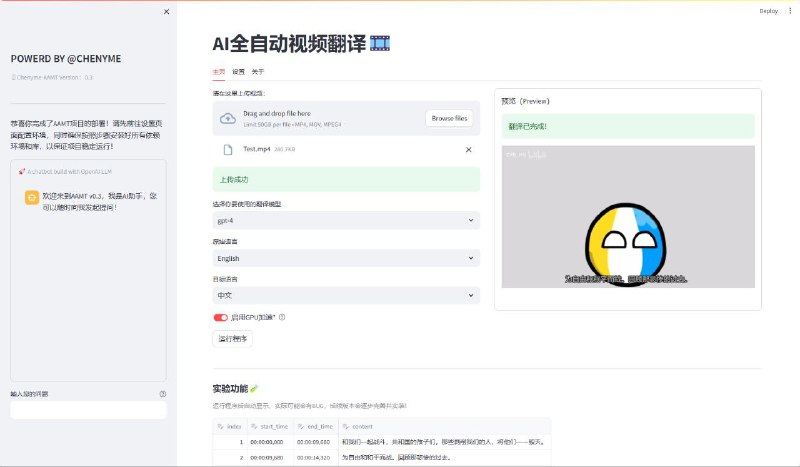
- Chenyme AAVT - 全自动视频/音频翻译工具
https://github.com/Chenyme/Chenyme-AAVT
一个简单易用的全自动视频(音频)识别、翻译工具,快速识别声音并翻译生成字幕文件,然后将翻译后的字幕与原视频合并,生成翻译后的视频。
主要基于 OpenAI 开发的 Whisper 来识别声音和 LLMs 辅助翻译字幕 ,利用 Streamlit 搭建快速使用的 WebUI 界面,以及 FFmpeg 来实现字幕与视频的合并。
#AI #Tool #Video #GitHub -
- 【害怕被FBI检查电子设备?这些技巧你一定要知道!-哔哩哔哩】 https://www.bilibili.com/video/BV1Xx4y1i7kU
https://www.youtube.com/watch?v=yBTbdEWcmws -
- 当打开 ChatGPT macOS App 时出现 "Coming soon - You do not have access to the desktop app yet" 时的破解方法:
1、下载登陆ChatGPT客户端 brew install --cask chatgpt
2、登陆ChatGPT客户端账户
3、在未出现“无法使用”的提示之前,快速按下「command + Q」
4、重新打开ChatGPT客户端就可以使用了!
#RePost #AI #Apple #macOS
ref: https://vxtwitter.com/imxiaohu/status/1791831563837358127 -
- Yet Another Pastebin

https://github.com/SharzyL/pastebin-worker
又一个文本/文件分享服务,可设置过期时间和密码,支持自定义 URL、语法高亮、更新内容、链接缩短等
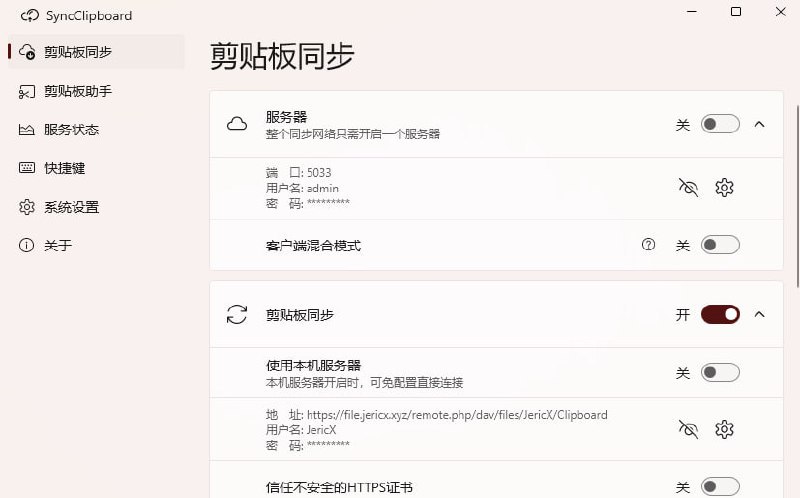
#Tool #GitHub - Clipboard - 跨平台剪贴板同步方案
https://github.com/Jeric-X/SyncClipboard
Clipboard 可以实现类似 Apple 生态中的共享剪贴板功能,实现 Windows、Mac、Linux、安卓、iOS 跨平台剪贴共享,支持文字、图片和文件
它可以部署到你的服务器或者使用 WebDAV 网盘作为服务器
#GitHub #Tool -
- Insanely Fast Whisper - 音频转文字工具
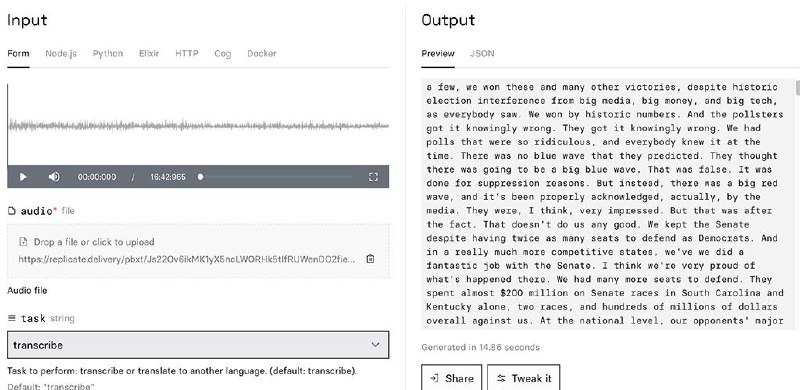
https://github.com/Vaibhavs10/insanely-fast-whisper
https://replicate.com/vaibhavs10/incredibly-fast-whisper
一个基于 OpenAI Whisper Large v3 模型的高速音频转文字工具,能够在不到 98 秒的时间内转录 300 分钟(5小时)音频。
适用于多场景,支持 100 种语言的转录并支持翻译功能,提供按词或片段生成时间戳文本,方便字幕制作。
提供命令列界面(CLI),也可以通过 Whisper API 进行线上语音转文字。
#Voice #AI #GitHub #Tool - WechatMoments - 微信朋友圈导出工具

https://github.com/tech-shrimp/WechatMoments
一款运行在 Windows 上的备份导出朋友圈为 HTML 的工具。
可以下载图片/视频离线查看,永久保存,还支持根据联系人,朋友圈时间进行过滤导出。
#WeChat #Tool #GitHub - Awesome gptlike shellsite - 精选套壳站和必备 API 资源

https://github.com/bleedline/Awesome-gptlike-shellsite
为初学者和经验丰富的运营者提供一站式指南,涵盖常见问题解答和基础攻略
#AI #GitHub #Doc